One bump photo is nice. Thirty of them, taken the same way, are something else: flip through them fast and you can watch the pregnancy happen. The trick is making every photo line up with the last one.
This guide covers how to set up once so every picture matches, how often to shoot, and how to turn the set into a short time-lapse video with a soundtrack of your own.
Set it up once
- Same spot. A plain wall near a window is ideal. Put a strip of tape on the floor where your feet go.
- Same camera position. Rest the phone on a shelf or a tripod at bump height, and mark that spot too. A photo taken from a different height or distance won’t line up.
- Same pose. Side-on to the camera, standing tall, one hand under the bump or both arms relaxed. Pick one and keep it.
- Same clothes. A fitted top in a plain color shows the change best. Something stretchy will last the whole series.
- Same light. Shoot at the same time of day, in daylight if you can, with the lamp off.
- Same shape. Decide on upright or sideways photos at the start. Upright suits a phone screen. Sideways suits a video.
How often
Once a week, on the same day, is plenty. Once a month works too and is easier to keep up. If you miss one, carry on. Nobody will notice a gap in the finished series.
Start now, whatever week you are in. The early photos, where nothing seems to change, are what make the later ones look dramatic.
Ideas for the series
- Hold a small sign with the week number, or add the number afterward when you edit.
- Bring in your partner, an older child, or the dog every few weeks.
- Take a second photo each time from the front. You will want both.
- Plan the last frame now: the same spot, the same pose, holding the baby.
Turn the photos into a time-lapse
- Collect them. Put the whole series in one album, in order.
- Line them up. Crop each photo so your head and feet sit at the same height in the frame. This step makes the biggest difference.
- Build the video. In Google Photos, the Create menu can turn 2 to 50 photos into an animation. In a video editor, such as iMovie on an iPhone, add the photos in order and set each one to show for about a third of a second.
- Finish with the baby. Add the final frame after the birth and let it stay on screen for a few seconds.
- Save a copy. Export the finished video and back it up with the original photos.
Add a soundtrack of your own
Music is the usual choice, and our list of songs about expecting a baby has ideas. If you plan to post the video, use the music library built into the app you are posting to, because copyrighted songs can get a video muted.
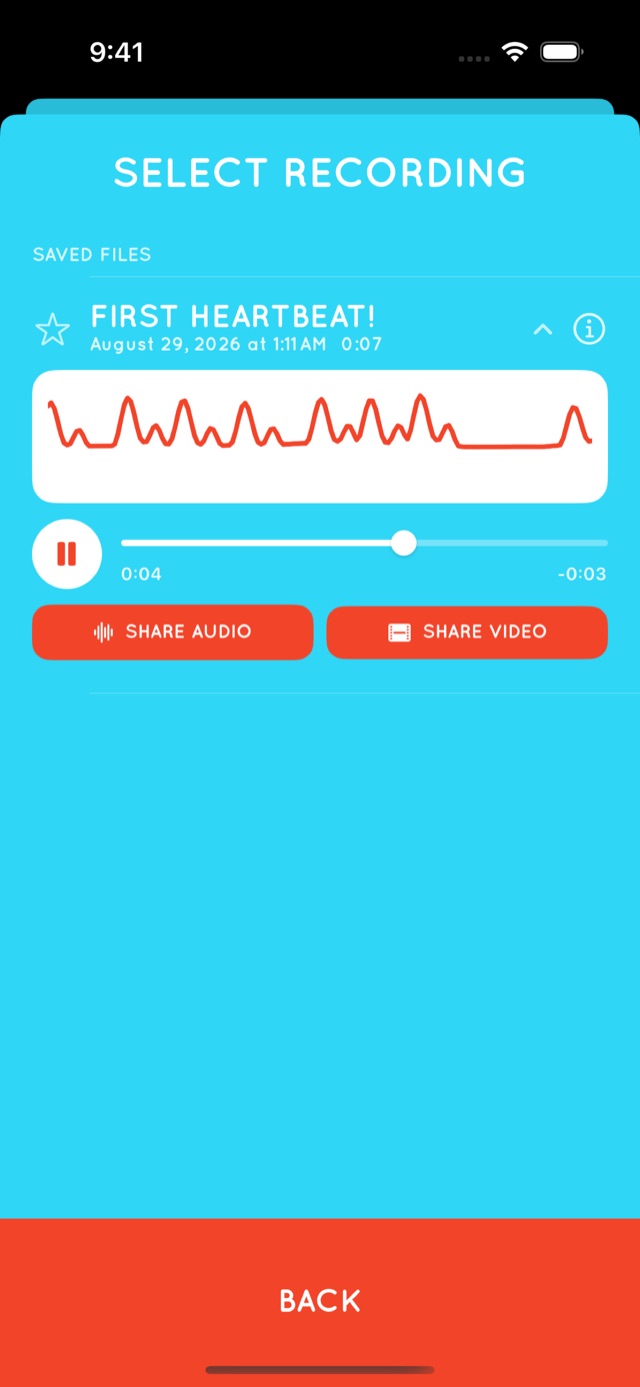
A recording of your baby’s heartbeat is more personal. Lay it under the photos, or open with a few seconds of it before the music starts. Our app, Flutter Baby Heartbeat Monitor, can share a saved recording as an audio file, which a video editor can use as a soundtrack. It works best in the last 12 to 16 weeks of pregnancy, it doesn’t work for everyone, and it is for keepsakes only, never for checking on your baby’s health.


Where to keep it
- Keep the original photos in a shared album that your partner can add to.
- Print a grid of nine or twelve of them for the wall or the baby book.
- Put one printed copy in your baby memory box.
Questions and answers
When should I start taking bump photos?
Whenever you like. Starting early gives you a longer series, and the photos where little seems to change make the later ones stand out.
How often should I take pregnancy progress photos?
Weekly is the most common, on the same day each week. Monthly works too. Consistency matters more than frequency.
What should I wear for bump pictures?
The same fitted, plain-colored top each time. Stretchy fabric will see you through the whole series.
What is the best pose for pregnancy progress photos?
Side-on to the camera, standing in the same marked spot, with the camera at bump height. Keep the pose identical from photo to photo.
How do I make a pregnancy time-lapse video?
Crop the photos so they line up, put them in order in a video editor or a photo app that makes animations, show each one for about a third of a second, and add music or your own recording.
Keep reading
- What to write in a pregnancy journal: prompts for every trimester
- Pregnancy milestones worth recording, and how to keep them
- Pregnancy apps for keeping memories
Add the sound to the pictures
Flutter Baby Heartbeat Monitor is free to download for iPhone, iPad, and Android. For bonding and creating memories and keepsakes — not a medical device. Learn more about Flutter.
This article is about keeping memories and isn’t medical advice. For anything about your health or your baby’s, talk to your midwife or doctor. Google Photos and iMovie are trademarks of their respective owners.