Most lists of pregnancy apps are about tracking. A pregnancy tracker counts weeks and symptoms, and a baby tracker counts feeds and naps. This list is about remembering. These are apps for bump photos, journals, and sharing with family, chosen because their store listings describe a feature for keeping memories.
Every app here is on both the App Store and Google Play, so two parents with different phones can use the same one. We checked the listings in November 2026. Features and prices change, so read the current listing before you commit.
What to look for
- Private by default. You decide who sees a photo of your bump.
- A way out. Can you export or print what you put in? An app you can’t get your photos out of is a risk.
- Both phones. If you and your partner use different phones, pick an app that runs on both.
- Low effort. The best memory app is the one you will open on a tired day.
For bump photos
- Pregnancy+. A pregnancy tracker from Philips. Its listings describe a My Bump section where you upload photos to build a visual pregnancy diary.
- Baby Story. A photo editor for pregnancy and baby pictures that adds milestone artwork and text to your own photos.
- Baby Pics. Another milestone photo editor, with artwork for pregnancy milestones as well as baby ones.
The app matters less than the method. Our guide to pregnancy progress photos explains how to take pictures that line up week after week.
For a journal
- Qeepsake. Sends question prompts by text message, starting in pregnancy, and files your answers and photos in a journal. Its listings say you can order printed albums.
- What to Expect. A pregnancy tracker whose listings describe a My Journal tool for notes and memories.
- Day One. A general-purpose journal app, not made for pregnancy, whose listings put privacy first.
If you would sooner write on paper, our pregnancy journal prompts work in any notebook.
For sharing with family
- Tinybeans. A private family journal for photos and updates. Its listings say you choose who follows along, by invitation.
- FamilyAlbum. A private photo and video album for families, with printed photo books as an option.
- Google Photos. Its listings say you can share albums with any of your contacts, including people who don’t use it.
For sounds
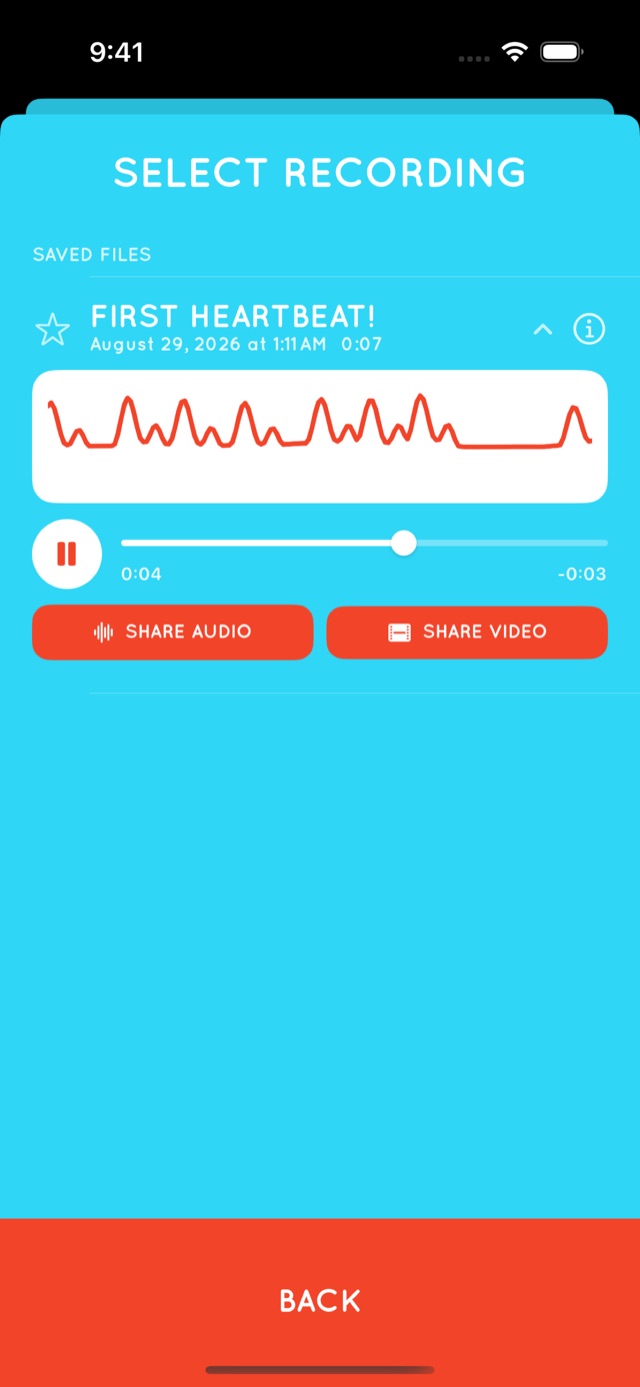
Photos and words are well covered. Sound is not. Our own app, Flutter Baby Heartbeat Monitor, uses your phone’s microphone to listen for your baby’s heartbeat late in pregnancy and save a recording. You can name each recording, keep a library, and share one as audio or as a video of its waveform. It works best in the last 12 to 16 weeks, it doesn’t work for everyone, and it is for keepsakes only, never for checking on your baby’s health.


The apps you already have
You may not need anything new. The camera, the notes app, and the voice recorder that came with your phone cover most of it.
- One shared photo album for the two of you.
- One running note, with a dated line whenever something happens.
- Voice memos for reactions, messages from relatives, and anything said at the shower.
Whatever you choose, back it up, and print a few things for the baby memory box.
At a glance
| App | Good for |
|---|---|
| Pregnancy+ | A bump photo diary inside a tracker |
| Baby Story | Milestone artwork on your photos |
| Baby Pics | Milestone artwork on your photos |
| Qeepsake | A journal you fill in by text message |
| What to Expect | A journal inside a tracker |
| Day One | A private, general-purpose journal |
| Tinybeans | Private sharing by invitation |
| FamilyAlbum | A private family album and photo books |
| Google Photos | Shared albums across any phone |
| Flutter | A heartbeat recording to keep |
Questions and answers
What is the best app for pregnancy memories?
It depends on what you want to keep. Pregnancy+ has a bump photo diary, Qeepsake builds a journal from text messages, Tinybeans and FamilyAlbum share photos privately with family, and Flutter records a heartbeat keepsake.
Is there an app for bump photos?
Yes. Pregnancy+ describes a My Bump section for a visual pregnancy diary, and photo editors such as Baby Story and Baby Pics add milestone artwork to your own pictures.
Is there a pregnancy journal app?
Qeepsake sends prompts by text message and keeps your answers. What to Expect describes a My Journal tool, and Day One is a general journal app that works for any subject.
How can I share pregnancy photos privately with family?
Use an app built for private sharing, such as Tinybeans or FamilyAlbum, or a shared album in the photo app you already use.
Keep reading
- Pregnancy progress photos, and how to turn them into a time-lapse
- What to write in a pregnancy journal: prompts for every trimester
- Baby heartbeat apps: what a phone can and can’t hear
The one for sound
Flutter Baby Heartbeat Monitor is free to download for iPhone, iPad, and Android. For bonding and creating memories and keepsakes — not a medical device. Learn more about Flutter.
Listings were checked on the App Store and Google Play in November 2026. App names are trademarks of their respective owners. Apart from Flutter, Polycene is not affiliated with any app mentioned here. This article is about keeping memories and isn’t medical advice. For anything about your health or your baby’s, talk to your midwife or doctor.